
Operating Manual
Making shooters better. A high-tech training gun for instructors that gives immediate feedback on use of force, trigger manipulation and targeting. It is built to help stop accidental and negligent discharges and to serve reality-based training, defensive tactics and firearm instruction.
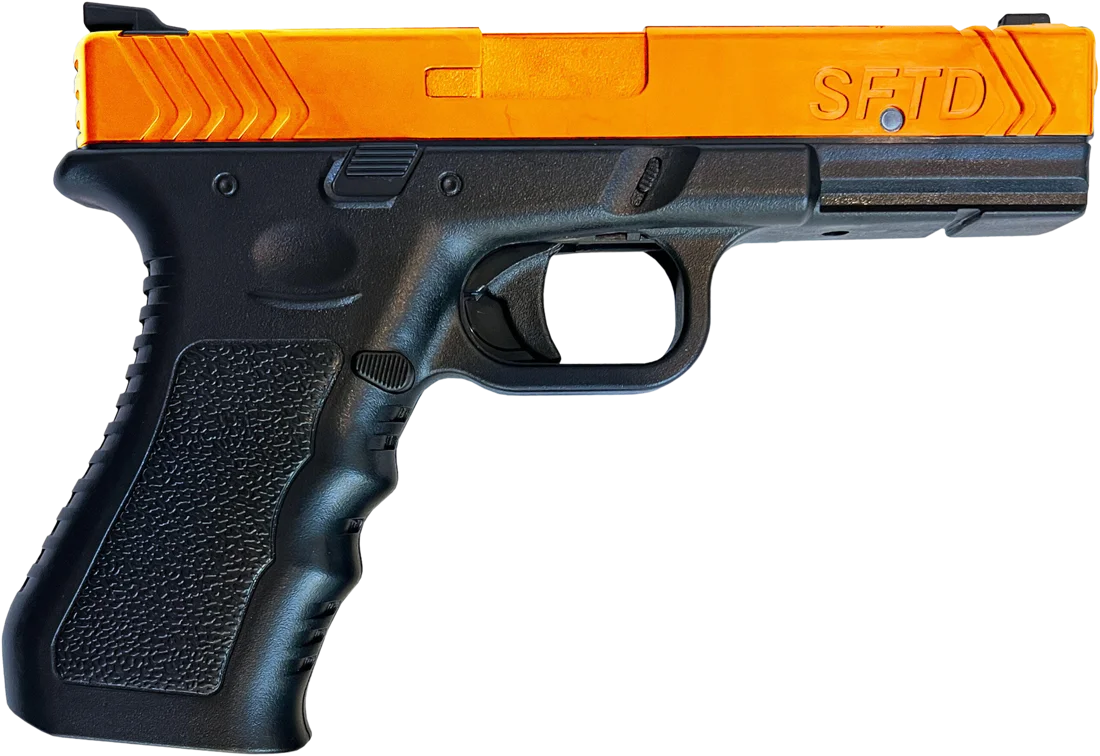
Features
The Instructor Series is designed to teach proper handling. Many of its features can be customised to help shooters improve their skills and safety.
Accidental Discharge Sensor
If a finger enters the Accidental Discharge Zone (inside the trigger guard) and no shot is fired, an alarm sounds and an orange LED flashes for 9 seconds. This alerts the instructor and reminds students to index their finger when not firing.
Round Counter
Counts rounds and stops firing (and emitting the laser pulse) when all rounds are fired. Eject and replace the magazine to resume. The instructor sets the number of rounds.
Random Round Count
The gun can pick a random number of rounds per magazine, so students can't predict when they will run dry.
Visual Shot / Incursion Indicator
Flashing lights show what happened, even from across the room when several training guns are in use.
Parts
Next Gen Series layout. The numbers match the callouts on the diagram.
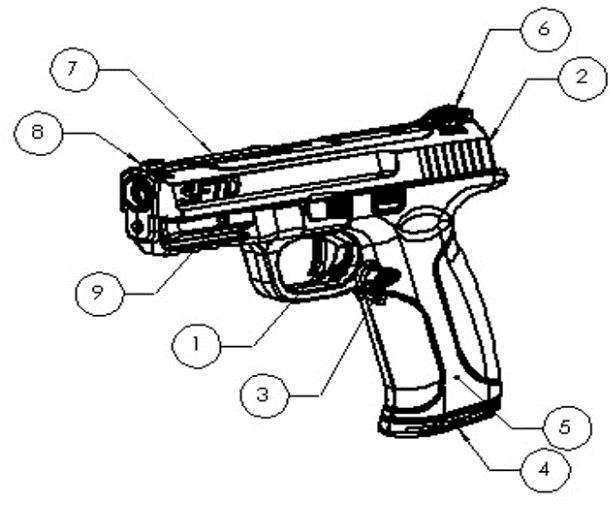
- 1Trigger / trigger guard
- 2Speaker
- 3Magazine release
- 4Magazine
- 5Allen key storage
- 6Rear sight
- 7Battery cover
- 8Front sight
- 9LED indicator light
Programming the device
Everything is set up through a voice-activated menu, using only the trigger.
- Enter the menuPull and hold the trigger for about 10 seconds. The gun says “program”.
- Scroll to a settingPull the trigger to step through the setting numbers listed below.
- Choose an optionThe gun prompts you for a selection. Select and release the trigger.
- Back to trainingThe gun says “ready”. It has left programming mode and is ready to use.
Settings
All menu settings, with their defaults where the manual states one.
| # | Option | What it does | Default |
|---|---|---|---|
| 1 | Accidental Discharge Sensor Sound & light | When a finger is in the trigger guard but the trigger is not pulled, an alarm sounds and the orange LED on each side flashes for 9 seconds. | Off |
| 2 | Accidental Discharge Sensor Sound only | Turns off the alarm sound only. The light still works, so trainers can see when an incursion happened. | — |
| 3 | Shot Sound | Toggles the shot sound on/off. | On |
| 4 | Laser Pulse | Configures the laser pulse / lane. Four pulse modes are available. | — |
| 5 | Round Counter | Toggles the round counter on/off. | Off unlimited ammo |
| 6 | Magazine Capacity | Sets the number of rounds in the magazine. | Unlimited |
| 7 | Bluetooth | Toggles Bluetooth on/off. Optional feature, only if equipped. | — |
| 8 | Random Magazine Capacity / Random Jam Mode | Toggles random magazine capacity / random malfunction on/off. The source manual names this setting two ways: “Random Magazine Capacity Mode” in the text and “Random Jam Mode” in the table. | Off |
| 9 | Reserved for future expansion | ||
| 10 | Intrusion Alert Delay | How long a finger must be in the trigger guard before the pre-shot alert triggers.
0.5 s1 s1.5 s2 s | 1 s |
| 11 | Post-Shot Alert Delay | Delay before the finger sensor alerts after a shot is fired.
1 s2 s3 s4 s | 2 s |
| 12 | Shotbox | If installed: changes Shotbox channels and handles pairing. | — |
| 13 | Reserved for future expansion | ||
| 14 | Reserved for future expansion | ||
| 15 | Factory Reset | Returns all settings to factory defaults. | — |
Start up & shut down
Start up
Insert the magazine. This turns the gun on, and it uses the last settings you chose.
Auto shut-down
If you don't do the shut-down procedure with the magazine out, the gun shuts itself down after 10 minutes.
Shut-down procedure
- Remove the magazine
- Clear the chamberPull and release the trigger to fire the remaining round in the chamber.
- Hold the triggerPull and hold the trigger for about 10 seconds.
- ReleaseThe gun says “shut down”. Release the trigger.
Battery, Allen key & sights
Battery & USB-C
Unscrew the top screw and remove the top cover (part 7). Swap in a new CR123 battery, refit the cover and tighten the screw. Your settings are kept. With a rechargeable CR123, charge through the USB-C port just forward of the battery.
Allen key
Stored inside the magazine well (part 5). Push it out with a pen or similar through the small hole on the outside of the gun.
Sight adjustment
Pro and Basic models: loosen the front or rear sight with the Allen key, slide the rear sight where you want it, then tighten.
Troubleshooting
Most problems come from a weak battery, so try a fresh CR123 first.
The device is making weird noisesBattery
The side orange LEDs are glowingBattery
It isn't showing all the shotsBattery
It isn't shooting
- Check that a magazine is inserted. The device won't fire without one.
- If the magazine is in and it still won't shoot, replace the battery.
- Still not shooting? See “seems electronically dead” below, then contact support.
It's acting strange
It seems electronically dead, even with a new battery
- Remove the magazine.
- Find the tab inside the magazine well and carefully pull it out slightly.
- Reinsert the magazine and test. The device should start up normally.
Important notes & warnings
Warranty
All Smart Firearms Training Devices come with a 90-day standard warranty, which can be extended up to two years from purchase. For warranty questions, email support@smartfirearms.us.