
TrueHunt Setup
Pigeon Flight Settings
Tune how the birds fly, flush and fall — from one simple speed dial to full control over wind, difficulty and behaviour.
Set the birds up your way.
The Pigeon Flight panel controls every released bird — how fast it leaves, which way it breaks, how the wind pushes it, and how it drops when hit. Changes take effect on the next bird released, so you can tune between rounds.
The panel has two modes. Simple is one speed dial plus wind — enough for most sessions. Flip on Advanced to open every control, laid out in three columns: Flight, Behaviour and Wind.
Every value is saved to your machine and reused next time. Reset to defaults puts the whole panel back to its starting values, and Done saves and closes.
Start Here
Simple or Advanced
Leave Advanced off and move the single Speed dial — it scales the whole flight envelope at once, so launch speed and acceleration follow along. Add Wind if you want it. Turn Advanced on only when you want to shape individual behaviours.
Simple Mode
One dial
Speed
Scales the entire flight envelope. Move it up for faster, harder birds; down for a gentler session. Launch speed and acceleration adjust with it automatically.
Match conditions
Wind & Wind From
Set how strong the wind is and the compass direction it blows from. Birds flush into the wind, then run with it — just like the real thing. Leave Wind at 0% for still air.
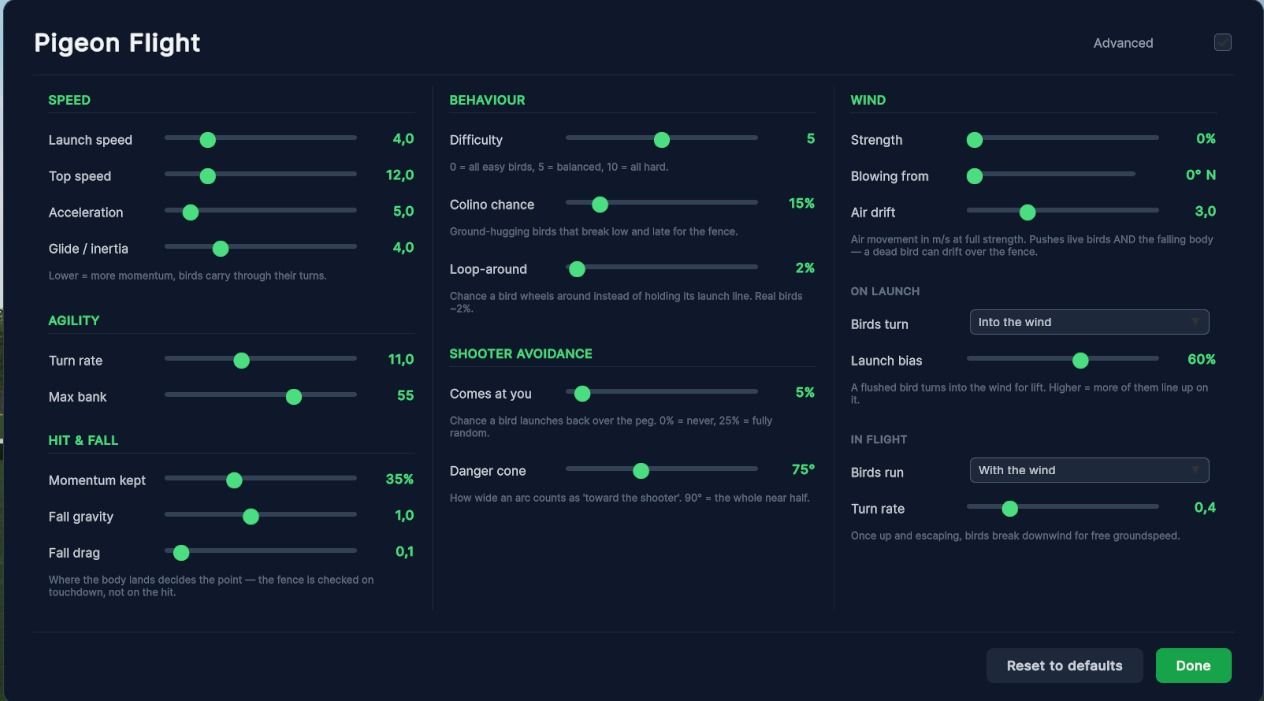
Advanced · Column 1
Flight
How fast the bird moves, how sharply it turns, and how it drops when hit.
| Setting | Default | What it does |
|---|---|---|
| Launch speed | 4.0 | The speed a bird leaves the trap at. Low values give a sluggish flush that winds up; high values burst away instantly. |
| Top speed | 12.0 | The cruising speed birds build toward. Difficulty spreads birds above and below this. |
| Acceleration | 5.0 | How quickly a bird reaches top speed. Lower is more sluggish — the bird eases up to pace rather than snapping to it. |
| Glide / inertia | 4.0 | How much momentum a bird carries. Lower values make birds float through their turns instead of changing direction on a dime. |
| Turn rate | 11.0 | How fast a bird can swing onto a new heading. Higher = snappier, more agile birds. |
| Max bank | 55 | How far a bird rolls into a turn, in degrees. Purely how hard the turn looks — it doesn't change the path. |
| Momentum kept | 35% | How much speed a hit bird carries forward as it falls. Higher makes it sail on; lower drops it closer to where it was hit. |
| Fall gravity | 1.0 | How fast a hit bird falls. 1.0 is real gravity; lower gives a slower, longer drop. |
| Fall drag | 0.1 | Air resistance on a falling bird. Keep it low, or the fall looks floaty. |
Advanced · Column 2
Behaviour
The mix of birds you face, whether they come back at you, and the odd balky one that won't leave the trap.
| Setting | Default | What it does |
|---|---|---|
| Difficulty | 5 | The mix of easy and hard birds. 0 = all easy, 5 = balanced, 10 = all hard. Each bird still varies within the mix. |
| Colino chance | 15% | How often a bird is a ground-hugging Colino — it stays low and breaks late for the fence. |
| Loop-around | 2% | How often a bird wheels around instead of holding its launch line. Real birds do this about 2% of the time. Higher makes them more erratic. |
| Comes at you | 5% | How often a bird is allowed to launch back over the peg. 0% = never toward you; 25% = fully random launch direction. |
| Danger cone | 75° | How wide an arc counts as “toward the shooter” for the setting above. 90° treats the whole near half as toward you. |
| No-fly chance | 0% | How often a bird sits in the trap before flushing, like a balky bird that won't leave. A shot fired at a sitting bird scores nothing. |
| Wait min / max | 2.0s / 6.0s | The window a balky bird waits before it flushes. Each one holds still for a random time between these two. |
Advanced · Column 3
Wind
Wind shapes the whole round. Birds take off into it for lift, then break with it to escape — and it pushes a falling bird too.
| Setting | Default | What it does |
|---|---|---|
| Strength | 0% | Overall wind strength. At 0% wind is off entirely and none of the settings below have any effect. |
| Blowing from | 0° N | The compass direction the wind comes from, shown as degrees and a heading — the way you'd read it on a real ground. |
| Air drift | 3.0 | How hard the moving air pushes. Affects flying birds and the falling body — a strong wind can carry a dead bird over the fence. |
| On launch · Birds turn | Into the wind | Which way birds face as they flush. Into the wind is the real behaviour — they need the headwind for lift. |
| On launch · Launch bias | 60% | How strongly the launch direction lines up on the wind. Higher = more birds take off straight into it. |
| In flight · Birds run | With the wind | Which way birds break once they're up and escaping. With the wind is the real behaviour — a tailwind is free speed. |
| In flight · Turn rate | 0.4 | How strongly an airborne bird swings onto the downwind line. Higher = birds commit to the escape sooner. |
Saving & Resetting
Your settings are kept on the machine and reused every session — set them once and they stick.
- ★ Changes take effect on the next bird released, so you can tune mid-session and watch the difference.
- ★ Done saves everything and closes the panel.
- ★ Reset to defaults returns every control — simple and advanced — to its starting value.
Simple & Advanced Stay in Step
Wind appears in both the Simple and Advanced views. Change it in one place and the other updates to match — there's only ever one wind setting.
Switching between Simple and Advanced never changes any values. It only shows more or fewer of the same controls.
Troubleshooting
| Symptom | Fix |
|---|---|
| I changed a setting but the birds fly the same | Settings apply to the next bird released, not the one already in the air. Release another bird to see the change. |
| Wind settings do nothing | Wind Strength is at 0%. Raise it — at 0% every other wind control is inactive. |
| Birds still launch back toward me | Lower Comes at you toward 0%, and check the Danger cone is wide enough to cover the arc you mean. |
| Birds never come toward me, even at higher settings | Shooter avoidance needs the simulator to know where you stand. It only applies during a normal round with a shooter position. |
| A shot at a sitting bird didn't score | That's intended — a bird shot while still in the trap is never a point. It only counts once it has flushed. |
| Dead birds drift over the fence and lose the point | That's the wind carrying them. Lower Air drift or wind Strength if you want less of it — the fence is judged where the bird lands. |
| I want to start over | Press Reset to defaults to return every control to its starting value, then re-tune from there. |